PuTTY and MobaXterm alternative for Windows: NexusTerm
The useful question is not which terminal wins every comparison. It is which workflow fits your daily tasks: a focused SSH client, a broad remote toolbox, or a workspace organised around command history and remote files.
PuTTY: a focused starting point
PuTTY is a free SSH and Telnet implementation with a terminal emulator. It remains a sensible option for a straightforward remote terminal. If that is all you need, buying a different client is not automatically an improvement.
MobaXterm: a broad remote toolbox
MobaXterm documents multiple remote protocols, X11 tools and a graphical SSH file browser. It offers both portable and installer versions. If X11 or a particular supported protocol is central to your work, compare those requirements carefully before changing tools.
NexusTerm: history and files in one workspace
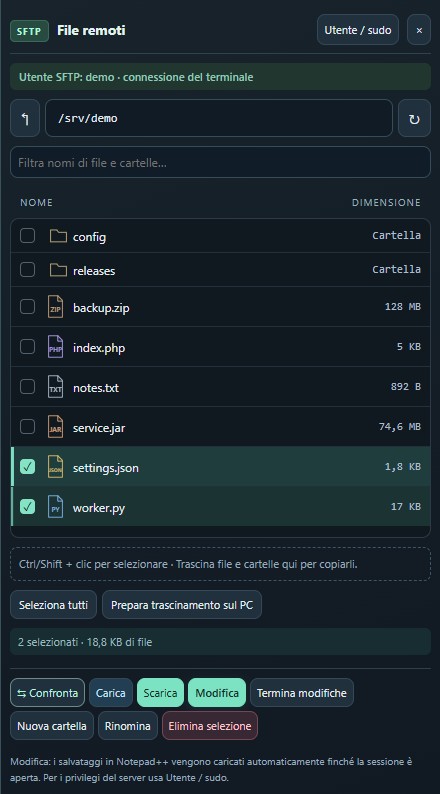
NexusTerm focuses on Windows SSH sessions, visible Bash history suggestions, compact SFTP and remote editing through included portable Notepad++. It also imports MobaXterm and mRemoteNG sessions. Imported RDP entries open the Windows RDP client; they are not an embedded RDP implementation.
When to choose NexusTerm as your alternative
- Commands you have used: search history by content, including words in the middle of a command, with user references.
- Remote files: recognise file types by their icons, select multiple files and download folders in the SFTP panel.
- Servers side by side: split the terminal into up to four simultaneous sessions.
- Release checks: compare files, folders and JAR contents. Inspect .class bytecode with a local JDK.
Test a representative session
Use the same server and user when evaluating a workflow. Recall a long command, find a log entry, transfer a test file and edit a disposable configuration. Check proxy rules and key authentication too. Measure whether you need fewer repetitive actions, rather than counting buttons.
Make migration deliberate
Keep your existing connection export and check the imported hosts, ports and usernames. Encrypted credentials may need to be entered again. NexusTerm costs €10 for the purchased version on one PC and one Windows user, with manual activation and offline license checks afterwards. It does not claim complete feature parity with either product.
Reference documentation: PuTTY official website · MobaXterm official features.
PuTTY and MobaXterm belong to their respective developers. NexusTerm is not affiliated.