Choose A. Choose B.
Open Compare in SFTP. Browse two locations, including different SSH sessions, and select files or folders. Context-menu shortcuts are still available.
A NEW GENERATION OF SSH TERMINAL
Less retyping. Fewer windows. More flow. Meet the portable SSH workspace that brings your history, remote files and everyday tools together.
Windows 10 / 11 · No installer · One-time purchase
Last login: today · public key accepted
deploy@web-01 ~/apps $ uptime
14:32:08 up 42 days, load average: 0.12
deploy@web-01 ~/apps $ kubectl get
Start typing. Your recent commands meet you halfway.
$ tail -f app.log
[INFO] service ready
[INFO] healthcheck ok
[INFO] listening :8080
Drop a file. Keep your terminal in view.
1 {
2   "service": "nexusterm",
3   "environment": "production",
4   "ready": true,
5   "port": 8080
6 }
Readable JSON. Ready to edit.
Everything you need. Right where you work.
WORK SMARTER / STAY IN FLOW
01 / HISTORY
Remember the beginning. NexusTerm suggests recent commands from your Bash shell as you type: choose one, complete it with Tab and press Enter when you are ready.
No sudo needed. Set automatic history globally or choose it for each connection.
02 / SFTP
Browse remote folders in a compact panel. Drag a file from your PC or another session, copy its path and open a preview only when you need it.
Search file contents, resize the preview and keep your terminal in view.
03 / EDITOR
Notepad++ portable is included, with tools for XML, JSON and file comparison. Open a remote file, edit it locally and transfer your changes when you save.
Readable configuration files. No second installation.
SSH / WINDOWS / PORTABLE
Bring history, visual SFTP and release comparisons into one workspace. Find the SSH client that fits your work and see what to consider before switching.
Compare PuTTY, MobaXterm and NexusTerm →SFTP / A CLOSER LOOK
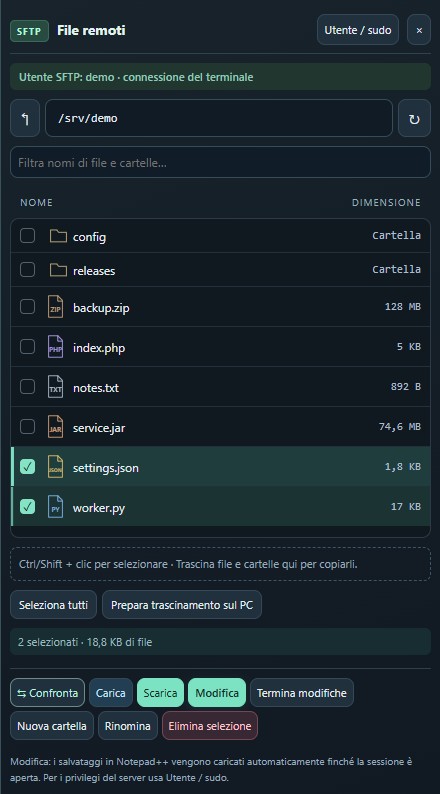
Tidy folders, fine icons and file types you can recognise instantly. Beside your terminal, with more room to work.
NEXUSTERM 0.12.1 / COMPARE
A configuration before and after a release. Folders on different servers. A JAR that no longer matches. Compare them directly from your NexusTerm SSH workspace.
public int value();
0: iconst_1
1: ireturn
public int value();
0: iconst_2
1: ireturn
Open Compare in SFTP. Browse two locations, including different SSH sessions, and select files or folders. Context-menu shortcuts are still available.
Temporary downloads use eight parallel SFTP reads per file. Analyse archives from disk, with ZIP64 support, search and paginated results for up to 100,000 entries per archive.
View bytecode compares methods, constants and JVM instructions side by side. It uses javap from a local JDK; it does not reconstruct the original Java or Scala source.
Learn how to compare files, folders and JARs →
Select multiple items with Ctrl and Shift, download them or delete them with one confirmation. Drag files and folders from your PC or between sessions; hold Shift to move within the same session. Fine icons distinguish JSON, Python, PHP and other formats, with readable sizes from B to TB.
PORTABLE BY DESIGN
Extract. Open. Connect. No installer, no setup ritual. Your terminal, SFTP and editor stay together throughout your working day.
Open your sessions and select Split 2, 3 or 4 beside the tabs. Each pane keeps its own terminal and SFTP panel, so you can move between servers while keeping your work visible.
Right-click a folder in SFTP and choose Download folder. Nested folders are included and a new local destination is created. Symbolic links and special files are excluded.
Top displays CPU usage, load averages, RAM, used space on filesystem / and a network traffic graph. Samples run about every three seconds over a separate SSH channel, without sudo. Requires Linux with access to /proc and df.
Import MobaXterm and mRemoteNG sessions. RDP connections open in the Windows client.
Configure HTTP or PAC and a bypass list for traffic managed by NexusTerm.
Credentials in an encrypted vault. SSH authentication with passwords or keys, including PPK.
Connect your own Ollama service or an OpenAI-compatible API. No bundled model weighing down the portable.
GOOD TO KNOW
Looking for a PuTTY or MobaXterm alternative? Start with the way you work.
NexusTerm runs from a folder on 64-bit Windows 10 and 11, without an installer. It is convenient on corporate PCs too; application execution remains subject to your organisation’s IT policies.
No. Suggestions use the history available to the current Bash shell user. Choose automatic activation in settings or enable it for a specific session.
A license for the purchased version on one PC and one Windows user, with no subscription. Delivery and activation are handled manually by email.
After paying with PayPal, email info@pcprogress.it with your transaction reference. We will send the package and instructions to generate your PC’s activation request, then issue the signed license for you to import.
No. License verification works offline after activation. SSH connections still require the appropriate network access to your servers.
NexusTerm brings an SSH terminal, Bash history suggestions, SFTP and a portable editor into one Windows workflow. Import your MobaXterm sessions and try a different way to organise your work. PuTTY and MobaXterm are independent products; NexusTerm is not affiliated with their developers.
PRACTICAL GUIDES
ONE WORKSPACE. YOUR WAY.
Windows 10 / 11 · No installer · One-time purchase
€10one-time
Buy with PayPal — €10PayPal · info@pcprogress.it
One PC · One Windows user · No subscription.
Manual delivery and offline activation by email.
Enter your contact email at checkout. We will contact you for delivery.